
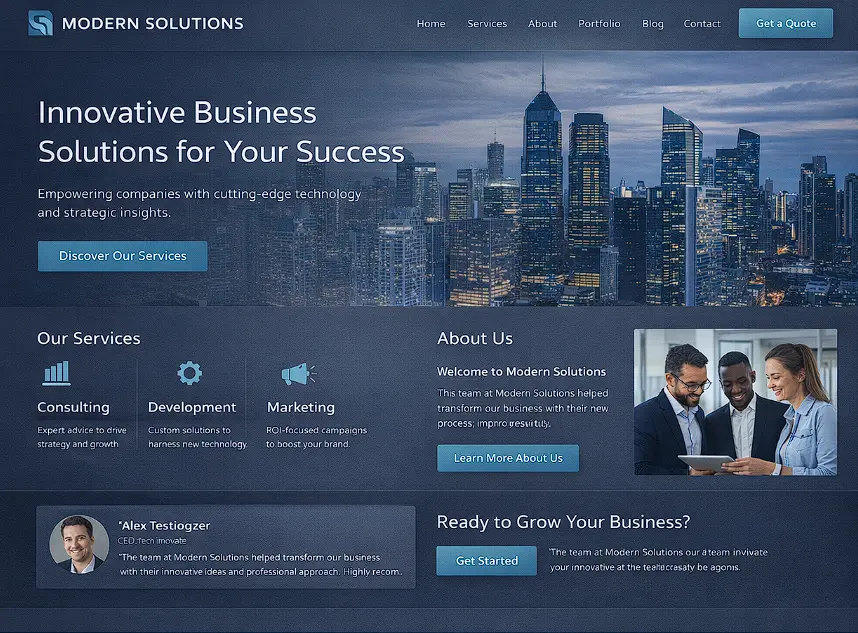
How to Create a Website in 2026: The Complete Guide
Whether you're building your first portfolio, launching a business, or creating a SaaS product, the process of building a website has never been more accessible — or more nuanced. The tools have gotten dramatically better, but so has the competition for user attention. This guide walks you through every stage, from initial goal-setting to post-launch improvement, with practical recommendations for each decision.
We'll cover both no-code paths (for those who want to move fast) and developer paths (for those who want full control), so you can choose the route that fits your situation.
Step 1: Define Your Website's Purpose
The single most important decision you'll make isn't which platform to use or what color scheme to pick — it's understanding why your website needs to exist and what it needs to accomplish.
Different website types have fundamentally different requirements. A portfolio needs to showcase work beautifully and load fast. An e-commerce store needs secure payment processing and robust inventory management. A SaaS product site needs to convert visitors into trial users through clear messaging and compelling social proof. A blog needs a CMS, RSS support, and strong SEO fundamentals.
Spend time answering these questions before writing a single line of code or importing a template: Who is your audience? What should they do when they land on your site? How will you measure success? The answers will save you weeks of rework later.
Step 2: Choose the Right Platform for Your Needs
Platform selection is where most beginners go wrong by defaulting to the most popular option rather than the most appropriate one. Here's a clear framework:
No-code / Drag-and-drop builders — Squarespace is excellent for visual portfolios and small businesses. Wix offers the most template variety. Framer is increasingly popular for design-forward product sites. These are ideal if you want to launch in days, not weeks.
CMS-based solutions — WordPress powers over 43% of the web and is the best choice for content-heavy sites, blogs, and anything needing a plugin ecosystem. The trade-off is more maintenance overhead and security vigilance.
Custom-coded frameworks — If you're building a product, SaaS, or something that needs to scale, frameworks like Next.js, Astro, or Remix give you complete control over performance, SEO, and user experience. This is the path we use for clients at Devian when building high-performance web products.
Step 3: Register a Domain and Set Up Hosting
Your domain name is your digital identity — choose it carefully. Keep it short, memorable, and brand-aligned. Avoid hyphens, numbers, and obscure TLDs. Most businesses should start with a .com unless they have a strong reason otherwise (e.g., .io for tech products, .co for startups).
For hosting, your choice significantly impacts performance, SEO, and reliability:
Managed hosting (e.g., Vercel, Netlify, Cloudflare Pages) — ideal for modern web frameworks. Deploy directly from Git, get global CDN distribution, and automatic HTTPS via SSL certificates out of the box. This is the standard for professional web development in 2026.
Traditional hosting (e.g., SiteGround, Namecheap) — suitable for WordPress sites. Offers cPanel access and shared or VPS options.
Always ensure your host provides 99.9%+ uptime SLA, daily backups, and proximity to your target audience's geographic region for better latency.
Step 4: Plan Your Site Architecture
Information architecture (IA) is how you organize and label your website's content. A well-structured site helps both users and search engines navigate efficiently.
Start with a sitemap — a simple list of all your pages and how they connect. Most sites need at minimum: a Home page, an About or Team page, a Services or Products page, a Contact page, and a Blog or Resources section if content marketing is part of your strategy.
Keep your navigation flat — users should be able to reach any page within 3 clicks from the homepage. Deeply nested hierarchies confuse users and dilute link equity for SEO. Use clear, descriptive labels rather than clever names that require interpretation.
Step 5: Design for Clarity and Brand Consistency
Design is not decoration — it's communication. Every visual decision either aids or impedes the user's ability to understand what you do and what they should do next.
Establish a design system before you start building pages: define primary and secondary colors, a typographic scale, spacing units, and component styles. Working without these foundations leads to inconsistency that erodes trust. For a deep dive into how design systems drive product quality, see our guide on building a design system for SaaS products.
Prioritize whitespace over density. Modern, high-converting websites are rarely cluttered — they give content room to breathe, which keeps focus on key conversion elements. Refer to the WCAG accessibility guidelines to ensure sufficient color contrast and readable font sizes from the start.
Step 6: Build and Populate Your Pages
With your architecture and design foundation in place, you're ready to build. Whether you're using a page builder or writing code, start with your highest-impact pages first: the homepage, hero section, and primary conversion page.
Write content before designing around it. Placeholder text leads to designs that break when real content is inserted. Your copy should be clear, specific, and benefit-oriented — users care about what your site can do for them, not what features it has.
Build in reusable components from the start: a consistent navigation header, footer with links and social handles, call-to-action blocks, and card components for content listings. This makes maintaining and scaling your site dramatically easier.
Step 7: Optimize for Mobile and Core Web Vitals
In 2026, over 60% of web traffic comes from mobile devices. Google uses mobile-first indexing, meaning it crawls and ranks based on the mobile version of your site. Mobile optimization is not optional.
Beyond responsive layouts, focus on Core Web Vitals — Google's performance metrics that influence search rankings:
LCP (Largest Contentful Paint): How fast the main content loads. Aim for under 2.5 seconds. Optimize by compressing images, using modern formats (WebP, AVIF), and preloading critical resources.
INP (Interaction to Next Paint): How quickly your page responds to user input. Minimize heavy JavaScript, defer non-critical scripts, and avoid long tasks on the main thread.
CLS (Cumulative Layout Shift): How stable your page is as it loads. Always set explicit dimensions on images and embeds to prevent layout jumps. Use Google Lighthouse in Chrome DevTools to measure and diagnose all three.
Step 8: Implement On-Page SEO
SEO is the discipline of making your website visible in search results for queries your target audience is searching. On-page SEO is within your direct control and has significant impact.
Start with title tags and meta descriptions for every page. The title tag should include your primary keyword and be under 60 characters. The meta description (under 160 characters) won't directly impact rankings but dramatically affects click-through rates from search results.
Use a single H1 per page containing your primary keyword, followed by H2s for major sections and H3s for subsections. Search engines use heading hierarchy to understand content structure. Add structured data (JSON-LD) where relevant — Article, FAQ, Product, and Breadcrumb schemas unlock rich snippets in Google Search.
Submit your sitemap to Google Search Console after launch and monitor it regularly for crawl errors, manual actions, and performance insights. It's the most valuable free SEO tool available.
Step 9: Test Everything Before Launch
Pre-launch testing is where avoidable problems get caught. Build a comprehensive checklist rather than relying on memory. At minimum, verify:
Cross-browser compatibility — test in Chrome, Firefox, Safari, and Edge. Safari on iOS handles certain CSS properties differently; always test on a real device.
All links and forms — every internal link resolves correctly, every form submits successfully and sends confirmation, every CTA button leads to the right destination.
Performance baseline — run Lighthouse and aim for a score above 90 across Performance, Accessibility, and SEO before going live. Technical debt compounds quickly; it's far easier to fix issues pre-launch.
Accessibility — verify keyboard navigation works, all images have descriptive alt text, and color contrast meets ARIA standards. Accessibility is both a legal consideration in many markets and a ranking factor.
Step 10: Launch, Monitor, and Iterate
Launch is not the finish line — it's the starting line. The most successful websites are those that improve continuously based on real user behavior and data.
Install analytics (Google Analytics 4 or a privacy-first alternative like Plausible or Fathom) before you launch so you capture data from day one. Set up conversion tracking for the actions that matter most — form submissions, sign-ups, or purchases.
Monitor your Core Web Vitals in Google Search Console regularly. As you add content and features, performance tends to degrade without active management. Run monthly Lighthouse audits to catch regressions early.
Build a content calendar if your strategy includes blogging or case studies. Fresh, authoritative content signals to search engines that your site is active and trustworthy. Internal linking between articles and service pages distributes ranking authority across your site.
When to Hire a Professional
No-code tools have genuinely democratized website creation, but there are scenarios where professional design and development pays for itself many times over: when your brand positioning demands premium presentation, when performance and SEO are critical to revenue, or when you need custom functionality no template can provide.
If you're at that stage, see examples of what purpose-built web experiences look like — then explore how we can help you build yours. For more technical guides on web development, browse our full insights archive.
Conclusion
Creating a website in 2026 is simultaneously simpler and more demanding than it has ever been. The tools are accessible, but the standard for quality has risen with them.
By following a structured process — defining your purpose, choosing the right platform, optimizing for performance and SEO, and committing to continuous improvement — you can build something that genuinely serves your users and earns its place in search results.
The most important step is the first one. Start with clarity about what your website needs to accomplish, and every subsequent decision becomes easier.
Reader Thoughts
0 comments — join the conversation
Be the First
No thoughts shared yet. Start the conversation with your unique insight.